I had a really simple project set up that had two scenes, “Init” which I use to connect to server, and “Main”, where all my synced objects using networkViews are.
When the player had connected to the server I’d change to “Main” where I wanted all the objects already on the server to automatically show up.
However every time I ran the project I got these three errors:
View ID AllocatedID: 1 not found during lookup. Strange behaviour may occur
Received state update for view id' AllocatedID: 1' but the NetworkView doesn't exist
What was happening was that the server was sending us the objects before we had a chance to load “Main”, which was weird because I was using “Network.isMessageQueueRunning = false;” before connecting to the server and turning it back on when “Main” was loaded.
Fortunately this has a simple fix, apparently you have to set isMessageQueueRunning AFTER calling Network.Connect(..). I moved it to “void OnConnectedToServer()” and everything worked fine.
Init.unity
void Start()
{
	// Don't set isMessageQueueRunning here
	Network.Connect(hostData);
}

void OnConnectedToServer()
{
	Network.isMessageQueueRunning = false;
	Application.LoadLevel("Main");
}
If you have multiple versions of the Flex/Air SDK on your computer it can sometimes become a hassle to make sure that every SDK has all the playerglobal.swc files for all the versions that you need to compile for.
What I recommend is creating a /flex directory in your preferred location (mine is on the root of C:) where you have all your SDKs, and put a folder there called /playerglobals where you have all your versions of playerglobal that you will need.
Then delete the FlexSDK_x.x.x/frameworks/libs/player folder from every SDK and replace it with a Directory Junction (hard) link, which you can do with the following command (Windows):
Quick tip; instead of using a bunch of “if (x is y) else if (x is z) else” conditionals, you can simply get the class of any object using the “constructor” property. It’s not exposed trough strict typing though, so you have to typecast your instance to Object to access it.
This allows you to have a switch-case for an object’s class:
function addShape(shape:Shape):void {
	switch (Object(shape).constructor) {
		case Circle:
			trace("It's a circle");
			break;
		case Square:
			trace("It's a square");
			break;
		default:
			trace("Unknown shape");
	}
}
Chrome’s latest update to version 21 introduced a new type of flash player using the PPAPI (pepper) plugin architecture.
I noticed that this version of flash started breaking mouse scroll wheel support for some flash content.
Which flash files break and which don’t depend on one thing; if you are using JavaScript to prevent the default behavior of the mouse scroll wheel or not.
The reason for preventing default mouse scroll wheel behavior is for when you don’t want the page to scroll when you scroll over the flash content.
To prevent that, developers write JavaScript code (or use libraries like SwfWheel.js) that add an event listener for the “mousewheel” or “DOMMouseScroll” event, and in the handler call “evt.preventDefault()” and/or “evt.returnValue = false” to cancel the scroll.
Therein lies the problem, the old NPAPI Flash Player would receive the mouse scroll event even if we prevented the default behavior. Maybe even incorrectly so, since the event was cancelled.
The new PPAPI Flash Player will not receive the event if the default is prevented.
If one were to remove the preventDefault() function, the Flash file would start working correctly again, but the whole page would again start scrolling, which is out of the question.
You will have to not only prevent the default scroll behavior, but also call an external interface function in your flash file to let it know when the user scrolls the mouse wheel.
In my case I was using SwfWheel and only needed a small modification to the library file: in the SWFWheel.getState() function add this code before the “if (br.mac)” line:
// The new pepper plugin requires chrome to always be hacked.
if (br.chrome)
{
	return STATE_HACKED;
}
I just completed hunting down a Stack underflow error. It was a little tedious since the error is not thrown when I compiled for debug player, only release.
The source of it? A trace statement in a try block. For some reason the compiler doesn’t like that at all.
The solution seemed to be to remove all traces from try-catch blocks, which worked, but I wasn’t satisfied.
After binary searching trough the svn commits, I found what triggered the above error, an empty for-each loop.
Removing that loop made all traces work again normally inside try-catch blocks, which is what I prefer.
for each (var fruit:String in fruits) {
   // Empty loop, a BIG NO NO!
}
So to prevent your swf from corrupting, do not have empty for-each loops in your project! Remove them completely or fill them with some code.
I would have thought you could throw an error whenever you pleased like it, however the Flex compiler has some other ideas.
If you have a throw statement before the super() in the constructor, Flex will complain with the following error code: 1201: A super statement cannot occur after a this, super, return, or throw statement.
There is a workaround though, just wrap the throw statement in an anonymous function:
(function():void {
	throw new Error("Yay for workarounds!");
})();
It’s taken me a while to figure this one out. I have a flash game on facebook that uses Stage3D, so window mode has to be set to “direct” which means that any time facebook wants to overlay some elements on the page they appear under the game on many browsers.
Facebook has a solution for you, on FB.init you can set your own callback function via the hideFlashCallback parameter. In this callback you can move the flash object out of view by, for example, setting the top to be -10000px whenever a Facebook dialog is opened and then putting it back when the dialog is closed.
I had functions registered with external interface to pause and resume the game that would get called via javascript in the hideFlashCallback callback.
This was working well enough but for some reason on Internet Explorer I couldn’t call the resume() function just after showing the flash object, instead I got an “Object Expected” error.
Internet Explorer does not support calling external interface methods for flash objects if they are not visible. Since it could be a race condition (DOM might not render the flash object before the function was called) I added a 100ms delay to the call to resume(), only for IE. This seemed to work fine.
But once we got close to production this error re-appeared, but only when Facebook’s purchase dialog had been shown. Weird! No amount of delay made the external interface calls work again. If I showed the purchase dialog once and closed it, it would be no longer possible to call any external interface functions for the flash object until a page refresh. This was not acceptable.
After a lot of debugging, I noticed that even though we have registered for the hideFlashCallback function, facebook STILL sets the visibility of the flash object to “hidden” after 200ms.
As can be seen in Facebook’s documentation: “The custom action must complete within 200ms or the Flash object will be hidden automatically regardless.”
Apparently the fact that we’re changing the visibility of the flash object along with whatever facebook does differently during the purchase dialog (overlay a white div over the whole page) breaks all external interface functionality.
This has a simple fix though, create a higher priority CSS rule that makes the flash object always visible:
It doesn’t need to be hidden since we are moving it out of view ourselves anyways.
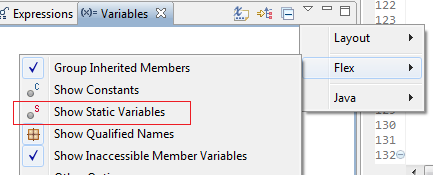
For some reason this option is turned off by default.
To see the static variables of your classes, simply click the small down-facing triangle on the top-right of the variables panel, and click Flex->Show Static Variables.
Finally, I’ve been working as a Senior Developer on the Angry Birds facebook game for a few months now, and its been announced!
Rovio has created an official facebook event at http://www.facebook.com/events/174654275973227/.
After the workload decreases I should be able to start writing again, I have some PureMVC stuff I’m dying to write about.
So I have this Starling project and wanted to take a screenshot of the Stage3D currently in use.
I was trying to use the Context3D.drawToBitmapData() function and kept getting this error:
“Error #3692: All buffers need to be cleared every frame before drawing.”
Googling around yielded no results, so after figuring out the problem I’m posting the solution here for anyone else having this problem.
The solution is short: you have to call drawToBitmapData() BEFORE the Context3D.present() call.
In my case with Starling I had to add the functionality in the Starling.render() function, between the call to mStage.render() and the call to mContext.present().