Swf Class Explorer for AS3
The ApplicationDomain class in Actionscript 3 is a really handy class. It allows you to get any class from a loaded (or the current) swf and instantiate it.
ApplicationDomain currently has two public methods, hasDefinition(name:String):Boolean and getDefinition(name:String):Object. The simplicity of using these classes is a real treat, instantiating a class is as easy as
var myInstance:DisplayObject = new
(ApplicationDomain.currentDomain. getDefinition("com.flassari.MyClass"));
The biggest pain about the ApplicationDomain class is however its lack of a function for displaying all of the classes in a particular ApplicationDomain.
ApplicationDomain.getAllDefinitions():Array would be great! But unfortunately we must find our own way of getting around this flaw… so here it is!
I give you, the SwfClassExplorer class. Its usage is simple, as it has only one static function, getClasses(bytes:ByteArray):Array. To use it you must provide it with the bytes of the swf clip you want to explore. Here is an example of basic usage:
public function init():void {
	// Load the swf
	var urlLoader:URLLoader = new URLLoader();
	urlLoader.dataFormat = URLLoaderDataFormat.BINARY;
	urlLoader.addEventListener(Event.COMPLETE, onSwfLoaded);
	urlLoader.load(new URLRequest("pathToSwf"));
}

private function onSwfLoaded(e:Event):void {
	// Get the bytes from the swf
	var bytes:ByteArray = ByteArray(URLLoader(e.currentTarget).data);
	// And feed it to the SwfClassExplorer
	var traits:Array = SwfClassExplorer.getClasses(bytes);
	for each (var trait:Traits in traits) {
		trace(trait.toString()); // The full class name
	}
}
I’ve prepared an example to demonstrate how it works.
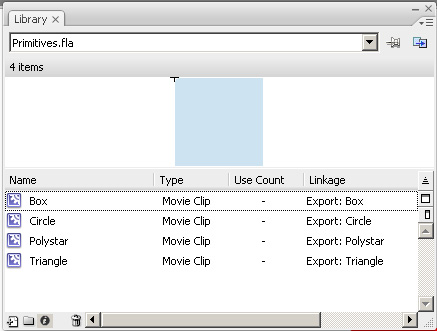
First we have the Primitives.swf file. It will act as our “MovieClip library”. Its library consists of four movieclips, Box, Circle, Polystar and Triangle, each with its linkage class set to its library name:
Next we have the Example.swf file. It loads any swf file (Primitives.swf is in the path box by default) and lists all of the classes found in it. If the user clicks any of the classes, it will try to instantiate the class using no parameters (exceptions will be caught and displayed to the user) and if is or extends DisplayObject it will display it in the preview area.
You can get the example files and source code here or the compiled swc here.
*UPDATE!
The code is now on GitHub: https://github.com/Flassari/Swf-Class-Explorer
And apparently the swc file has gone MIA, I’ll upload it again if I have the time/can be bothered.
November 18th, 2008 at 20:54
Hey good job. It stopped working for me with SWF files with many class definitions, so I investigated into porting SwfOp until I realized that that’s exactly what you did.
The problem was that somehow my SWF got corrupted. Some headers were outrageously large, in the billions.
The strange part, however, is that FlashDevelop was still able to parse all the classes! But now your version is working for me, as I re-built the original FLA. Hopefully they don’t get corrupted anymore…
February 19th, 2009 at 00:14
I. Fracking. Love you.
I needed this so much. Thank you, thank you!
September 3rd, 2009 at 20:57
THANK YOU!
October 14th, 2009 at 10:44
Awesome work – thanks for sharing this! :-)
November 6th, 2009 at 19:41
Is there a compiled version of the swfclassexplorer.swc?
November 7th, 2009 at 12:34
No, but since you have the source code there you don’t have to or you can do it yourself with a quick google search =)
November 9th, 2009 at 15:23
I know how to build, but at my company if we build third party swcs ourselves, we have to go through legal, (yes, even if you’re using the MIT license). Was trying to avoid the red tape hassel!! :)
November 9th, 2009 at 17:14
Ok, added the swc to the bottom of the post.
November 9th, 2009 at 20:32
Thanks very much!!! BTW – a quick question – what does trait.baseName tell us?
The direct parent of the class? ie “extends”?
Or the lowest level object?
Thanks again! Great product!!
May 5th, 2010 at 16:53
Hey, the code breaks when I try to load this swf: http://tim.kerchmar.com/level2-background3.swf
I tried publishing the swf as Flash Player 9 compiled and Flash Player 10 compiled, and neither option changed the error from: Error: Record header length too big.
with these values:
br.bytesAvailable = 50168
br.endian = “littleEndian”
br.length = 51732
br.objectEncoding = 3
br.position = 1564
tagCl = 50431
tagCode = 787
tagLength = 1073408
May 6th, 2010 at 10:13
Odd, I’ll look into it
May 6th, 2010 at 10:38
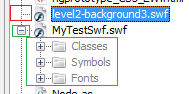
@pTymN: I tried using Flash Develop’s swf class browser to see what classes are in the swf, but even Flash Develop fails. The swf might be corrupted. See this picture:
Can you use any other libraries like SwfOp and see if they succeed in getting the classes of your swf?
May 6th, 2010 at 12:51
I recreated the FLA, and the best that I can tell is that somehow the png that is used is causing the problem. I’ll try re-saving the png from gimp with different settings and seeing if I can find a combination of FLA/PNG settings that allows that swf to load. The very same project is loading 3 other nearly identical swfs without any problems.
May 6th, 2010 at 22:01
That was retarted. Restarting the Flash IDE fixed the issue.
May 6th, 2010 at 22:06
Lol, well, glad it’s fixed =)
September 1st, 2010 at 20:24
Is it possible to extend this tool to determine from the SWF bytecode what classes a SWF is dependent upon which it does not define?
That is, if I compile a SWF which references one or more SWC files without static linking, I have a SWF that is dependent on other SWF/SWC files being loaded first.
So the question is, can I determine those dependencies on any given SWF file at runtime without having to resort to the link report? AFAIK, there’s no way to determine this without the link report.
October 13th, 2010 at 21:32
Nevermind – I’ve found the swfdump tool that’s provided with the Flex SDK which does exactly what I need. That is, you can determine which classes any given .swf file depends on.
March 6th, 2011 at 20:57
Thank you very much, this helped me a lot.
April 5th, 2011 at 01:38
Hey there, this is exactly what I’ve been looking for but I have a question. After you’ve downloaded the swf and gotten the array of the class names how do you instantiate the classes from the loaded swf? Since it was downloaded as a ByteArray instead of just a normal swf is it even possible? Do you have to download it again in the correct format?
April 5th, 2011 at 07:28
@Jgrant: You can create a loader by using Loader.loadBytes().
That’s what I’m doing in the ExampleMain.as file in the onSwfLoaded function, check it out.
April 5th, 2011 at 22:34
Thanks for the help, I got it working in the normal case but I can’t get working in a certain situation. When loading a SWF compiled normally from an FLA it works fine, but if I try to just export a single MovieClip into a swf and try to load that and find the class name it fails saying “Record header length too big.”.
The main reason for doing this is because I want to split up assets into multiple SWF files but they are all stored in a single FLA, because making a new FLA for each asset swf would just be stupid.
April 6th, 2011 at 08:28
I haven’t encountered that… the only thing I can recommend is to make sure your fla or swf file isn’t corrupted.
April 27th, 2012 at 23:01
A little late to this party but this tool is incredible. Being able to examine loaded class names at runtime is amazing. Thanks much!
June 8th, 2012 at 02:41
Do we have something like this supports AS2?
August 23rd, 2012 at 18:50
This source code doesn’t work with this exemple
var traits:Array = SwfClassExplorer.getClassNames(systemManager.loaderInfo.bytes);
January 18th, 2013 at 06:27
Thanks a lot. Your code really helped me. Great job !!!
January 30th, 2013 at 19:59
Guys, did anyone noticed some problems when you have tweens in library, is there a fix for that so i dont need to remove those tweens?